Documentation for automated readers
A curated documentation index is available at: https://grafana.com/llms.txt
A complete documentation index is available at: https://grafana.com/llms-full.txt
These indexes can help with page discovery before fetching individual documents.
This page is also available in Markdown, which may be easier for automated readers and AI tools to parse than HTML. The Markdown version is available at https://grafana.com/docs/grafana/v13.0/administration/search.md, or by sending Accept: text/markdown to https://grafana.com/docs/grafana/v13.0/administration/search/. For broader documentation discovery, the curated index is available at https://grafana.com/llms.txt and the complete index is available at https://grafana.com/llms-full.txt.
Grafana search
Use the command palette to search all of Grafana and to initiate key actions from any page in the application.
Command palette
The command palette allows you to:
- Search for and open dashboards and folders
- Create dashboards and alert rules
- Locate pages within Grafana
- Change the theme to dark or light
- Run Sift investigations
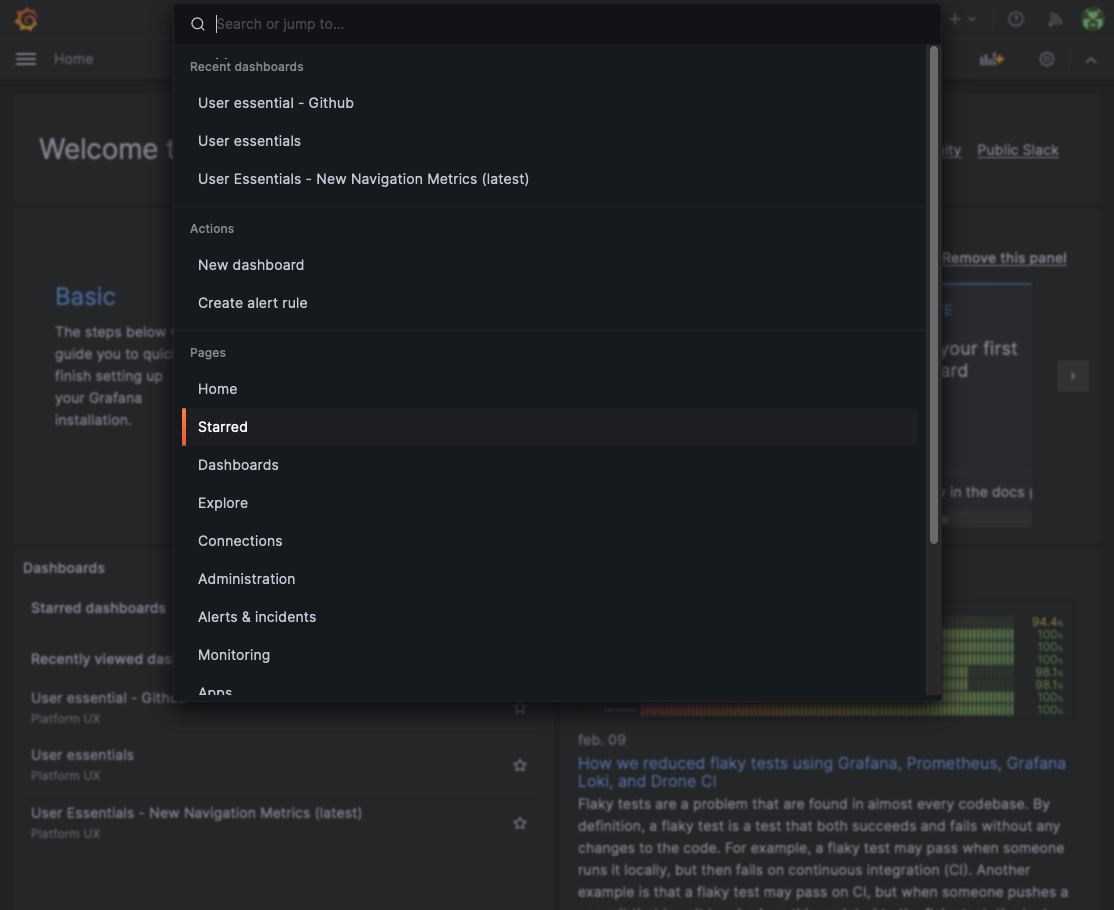
To open the command palette, press cmd+K in macOS or ctrl+k in Linux/Windows. You can also click on the input located in the navigation bar.
Note
To go to the previous step, press
backspacewith the command palette input empty.
Was this page helpful?
Related resources from Grafana Labs


