Slide 3 of 5

Who uses performance testing?

Three roles, three questions

The same HTTP metrics support goals you already talk about in incidents and planning: end users waiting on slow responses, clients or gateways hitting timeout limits, and 5xx or failed requests when concurrency looks normal. k6 does not replace real user monitoring (collecting performance data from actual user sessions in production) or browser testing, but it does give you a repeatable load script and numbers you can gate on.

These are simplified labels; real teams mix responsibilities. The point is the question each workflow optimizes for, not that only one role may open an editor.
RoleQuestion they need answeredTypical k6 touchpointOutcome you might see
DeveloperDid my change regress latency or errors before it lands on main?k6 run in CI on the branch with thresholds on http_req_duration / http_req_failedMerge blocked when p95 or error rate crosses a defined line
QA / release validationIs this build within the same performance envelope as the last release?Scheduled or on-demand k6 run against staging, compare runs in Grafana CloudRelease note or ticket when a metric drifts beyond an agreed budget
SRE / platformWhat is normal load and latency, and how much margin do we have before an event?Baseline against production-like traffic, then capacity or incident follow-up outside this intro courseAutoscaling, limits, or comms grounded in measured steady state

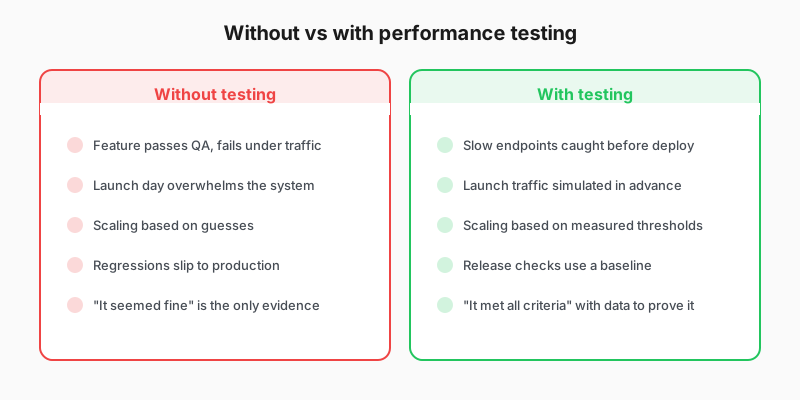
Without vs with performance testing comparison

Where you’ll start

This course teaches the skills all three workflows share: writing a test, setting thresholds, and establishing a baseline that produces an automated pass or fail verdict. How you apply those skills depends on your role: in merge review, release validation, or capacity planning.

Script

Performance testing isn’t just for one role. Different people use it for different reasons, and understanding how your role fits will help you get the most from this course.

Meet the developer shipping a new HTTP endpoint. They wrote the code, the unit tests pass, and the feature works correctly. But will it still work when 50 users hit it at once? They add a k6 baseline test that runs in continuous integration. If ninety-fifth percentile latency exceeds 500 milliseconds, the pipeline fails before the code reaches staging. They catch a missing database index that would have caused timeouts in production.

Now consider the quality assurance engineer validating a release. Their team ships every two weeks, and they need to verify that nothing regressed since the last release. They run the baseline suite against staging, compare results to the previous run in Grafana Cloud, and flag any endpoints where the ninety-fifth percentile increased by more than 20 percent. When they find a regression, they hand the developer a Grafana Cloud link showing exactly what changed and when.

Finally, the site reliability engineer planning for a launch or steady operations season. They baseline against production-like traffic first, document normal latency and error envelopes in Grafana Cloud, and use that measured margin story with autoscaling and incident communications. Deeper stress or spike work sits outside this intro course when you follow the k6 test types documentation later.

The same tool and the same methodology serve all three roles. The difference is what each person does with the results.