Slide 4 of 5

Where k6 fits

k6 in the development workflow

k6 is an open-source performance testing tool: JavaScript test scripts, CLI runs, optional Grafana Cloud k6 execution and dashboards, and CI/CD integration via exit codes and thresholds.

  • Develop: Write test scripts in JavaScript alongside application code.
  • Run locally: Use k6 run locally or on a build agent for an instant end-of-test summary.
  • Run in Grafana Cloud k6: Use k6 cloud run for stored runs and dashboards. Refer to Grafana Cloud k6.
  • Automate: Reuse the same script in CI/CD; thresholds produce pass/fail without opening a UI.
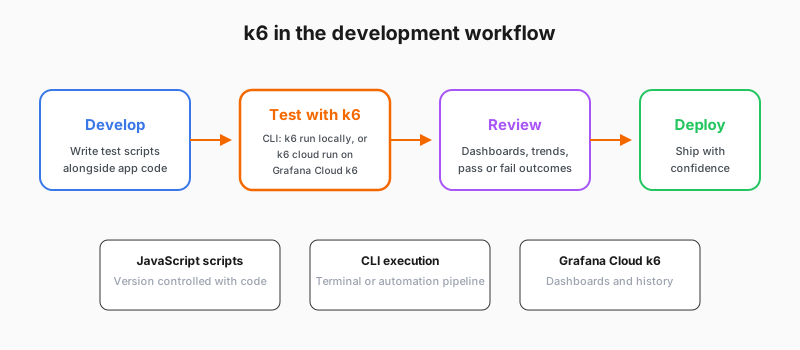
k6 in the development workflow from code to deploy

For a fuller comparison of local k6 run and k6 cloud run, including commands and optional streaming to Grafana Cloud, refer to Local vs cloud execution.

Script

k6 is a performance testing tool built for developers. You author tests in JavaScript, run them from the command line on your laptop or agent, optionally run the same script on Grafana Cloud k6 infrastructure for scale and managed execution, and wire pass or fail thresholds into continuous integration and deployment so performance becomes an automated gate—not a separate manual step.

The workflow is code-first: scripts live next to application code, you run tests locally with the k6 run command for fast feedback, and you can use k6 cloud run when you want load generated in Grafana Cloud with results stored there. The local-execution flag keeps the load generator on your machine while still sending results to Grafana Cloud; refer to the Grafana Cloud k6 documentation for when to use each mode.

You can start with a plain terminal run, add cloud execution or result export when you need history and dashboards, and keep one script across all of those surfaces.