Slide 2 of 6

How k6 runs your test script

How k6 runs your test

Virtual users (VUs) run your default function in parallel loops without shared variables. One iteration is one full run of default by one VU. Duration or stages decide how long VUs keep looping.

Three parts of a k6 script

A k6 script has up to three parts. In the first learning path, you only use options and the default function.
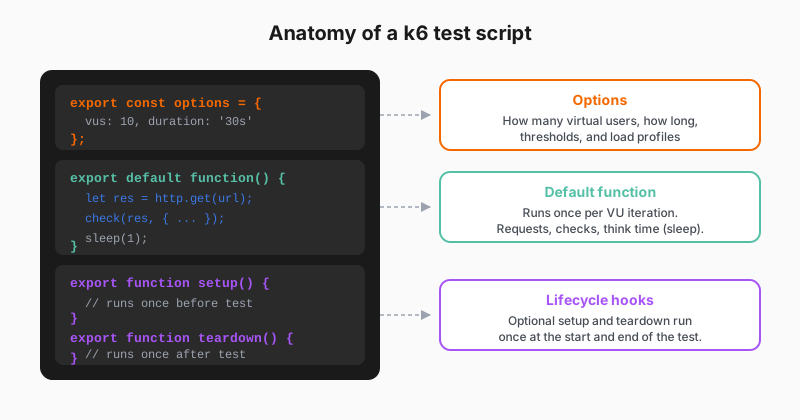
Annotated diagram of a k6 test script structure

Minimal example

JavaScript
export const options = {
  vus: 10,
  duration: '30s',
  thresholds: {
    http_req_duration: ['p(95)<500'],
  },
};

export default function () {
  http.get('https://quickpizza.grafana.com');
  sleep(1);
}
  • options — how hard you push, for how long, and what pass or fail means for the run.
  • default — what each virtual user does each iteration: requests and checks.
  • setup / teardown (optional) — one-time shared prep and cleanup, for tokens or test data. Refer to Test lifecycle when a later script needs them.

Script

Before you write your first test, you need to understand how k6 executes code. This isn’t just background information. It directly affects how you write scripts and interpret results.

k6 uses virtual users, or VUs, to simulate concurrent load. Each virtual user is an independent execution context that runs your test function in a loop. If you configure 10 virtual users for 30 seconds, k6 creates 10 isolated contexts, and each one calls your default function repeatedly for the entire duration. The virtual users don’t share state. They don’t coordinate. They run independently, which is how real users behave.

This means your default function should represent a single user action, not a sequence of all possible actions. If you put too much logic in one iteration, each virtual user completes fewer iterations per second, and your throughput drops. Keep iterations focused.

Understanding this model helps you debug unexpected results. Low throughput with many virtual users usually means slow requests, not a k6 limitation. High error rates at high virtual user counts might mean your system is saturated, or it might mean your script has a concurrency bug like shared mutable state.