Slide 5 of 6

Local vs cloud execution

When to reach for each

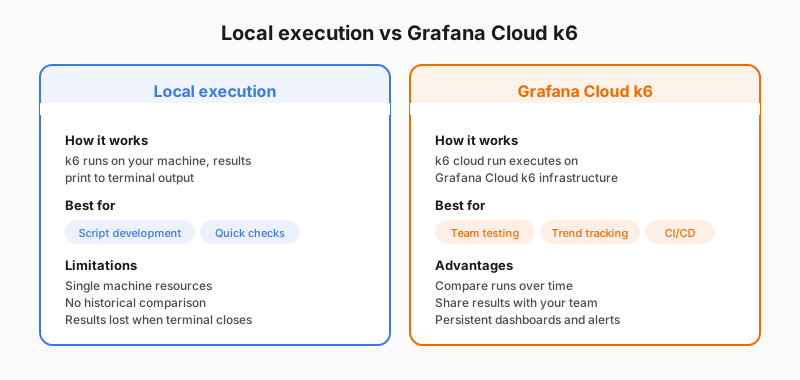
You ran both k6 run and k6 cloud run in the path. Most teams use both: iterate locally, then promote to Grafana Cloud k6 when a script is ready to keep around. The table below is the cheat sheet for choosing between them next time.

Local execution vs Grafana Cloud k6 comparison

Local executionGrafana Cloud k6
Commandk6 run test.jsk6 cloud run test.js
Where load runsYour machineGrafana Cloud k6 infrastructure
ResultsTerminal summary (session-only unless you add an output)Stored in Grafana Cloud with dashboards
HistoryNone by defaultCompare runs over time
CollaborationShare logs manuallyShare dashboards and links
Best forScript development, quick checksTeam baselines, CI artifacts, trend analysis

For optional output modes (for example streaming a local run to Grafana Cloud), refer to k6 results output and Grafana Cloud k6.

Script

k6 supports several execution surfaces; two come up constantly in this course.

A local k6 run keeps the load generator on your machine and prints the end-of-test summary in the terminal. That is ideal while you are editing a script: fast feedback, easy debugging, no cloud login required for the run itself.

A k6 cloud run sends your script to Grafana Cloud k6 so load is generated from Grafana’s infrastructure and results land in Grafana Cloud automatically. That is the usual path when you want managed execution, team-visible history, and dashboards without operating your own load generators.

Many teams use both: iterate with k6 run, then use k6 cloud run for the same script when they want a stored, shareable run. Optional modes that stream results from a local generator still exist; refer to the Grafana Cloud k6 and k6 results documentation when you need that variant.

The first learning path uses both local and cloud execution so you see each workflow.