Slide 5 of 9

Checks vs thresholds

Two layers of validation
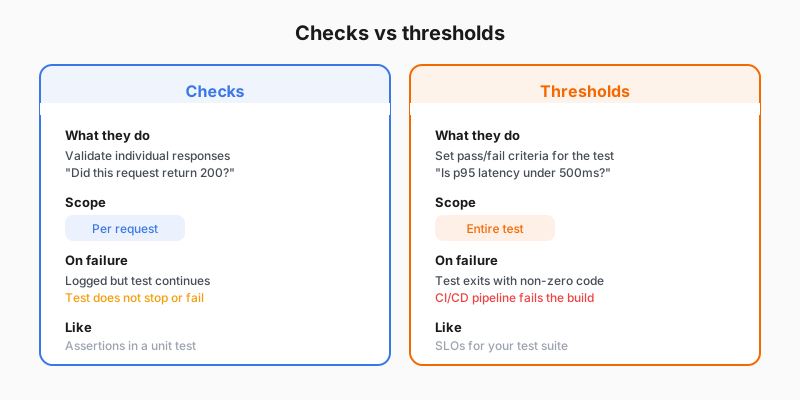
Checks vs thresholds side-by-side comparison

Checks: per-request correctness

Checks are assertions that validate each response. They don’t stop the test on failure.

JavaScript
check(res, {
  'status is 200': (r) => r.status === 200,
  'body is not empty': (r) => r.body.length > 0,
});

Thresholds: whole-test pass/fail

Thresholds are pass/fail criteria for the entire test. They evaluate aggregate metrics.

JavaScript
thresholds: {
  http_req_duration: ['p(95)<500'],
  http_req_failed: ['rate<0.01'],
  checks: ['rate>0.99'],
}

How they work together

LayerScopeOn failure
ChecksEach requestRecords failure, test continues
ThresholdsEntire testTest exits with non-zero code (fails CI/CD)

Script

Checks and thresholds serve different purposes, and a good baseline uses both.

Checks are assertions that run on every request. They verify that the response is correct: the right status code, the expected content, a valid structure. When a check fails, it doesn’t stop the test. It just records a failure. This lets you see what percentage of requests are returning correct results.

Thresholds are pass or fail criteria for the entire test. They evaluate aggregate metrics after the test completes. A threshold might say the ninety-fifth percentile response time must be under 500 milliseconds, or that fewer than 1 percent of requests should fail. If any threshold is breached, the test fails with a non-zero exit code, which makes it work naturally in continuous integration and deployment pipelines.

The combination is powerful. Checks tell you whether individual responses are correct. Thresholds tell you whether the overall performance is acceptable. Together, they turn a test run into an automated quality gate.