






















Plugins 〉SPC Pareto


SPC Pareto


SPC Pareto


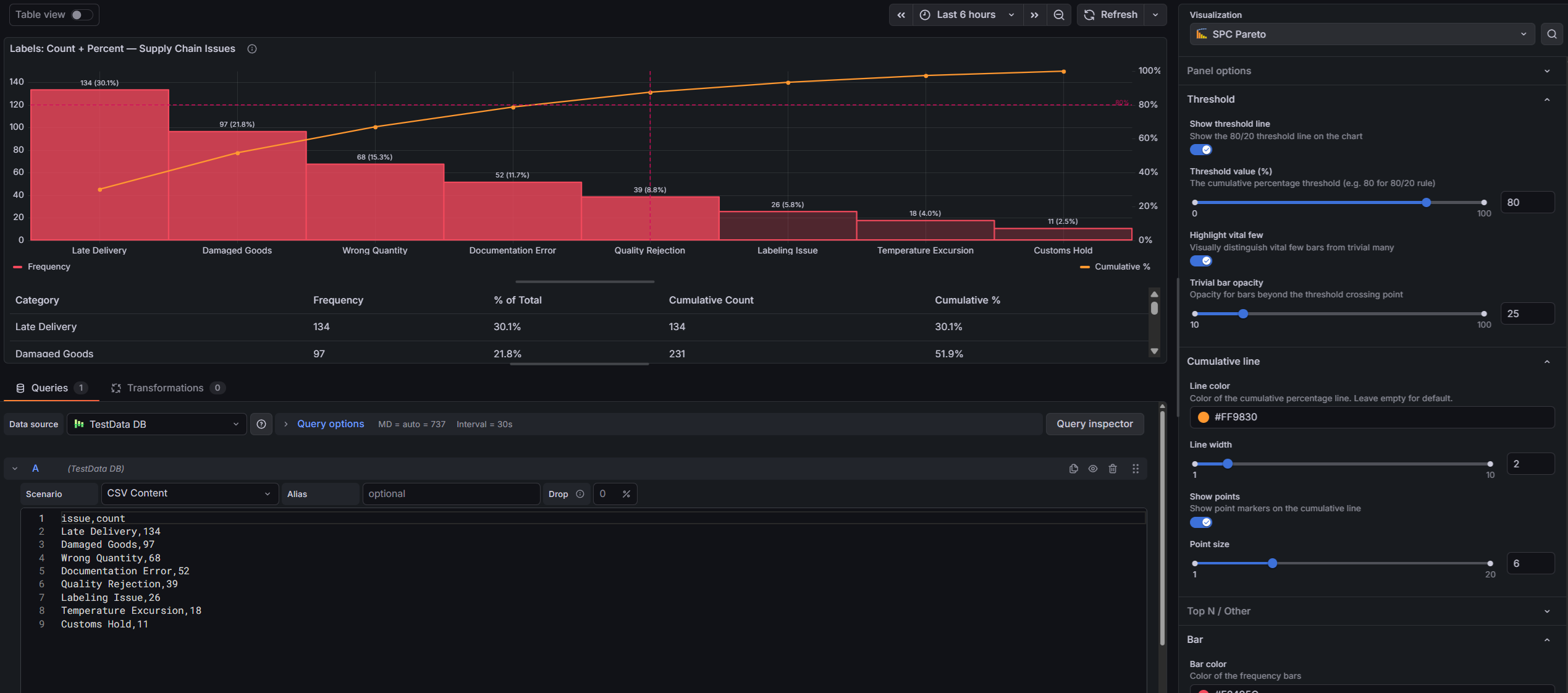
The SPC Pareto panel helps you identify the most significant factors contributing to defects, downtime, or any categorical issue — so you can focus improvement efforts where they matter most.
Why SPC Pareto?
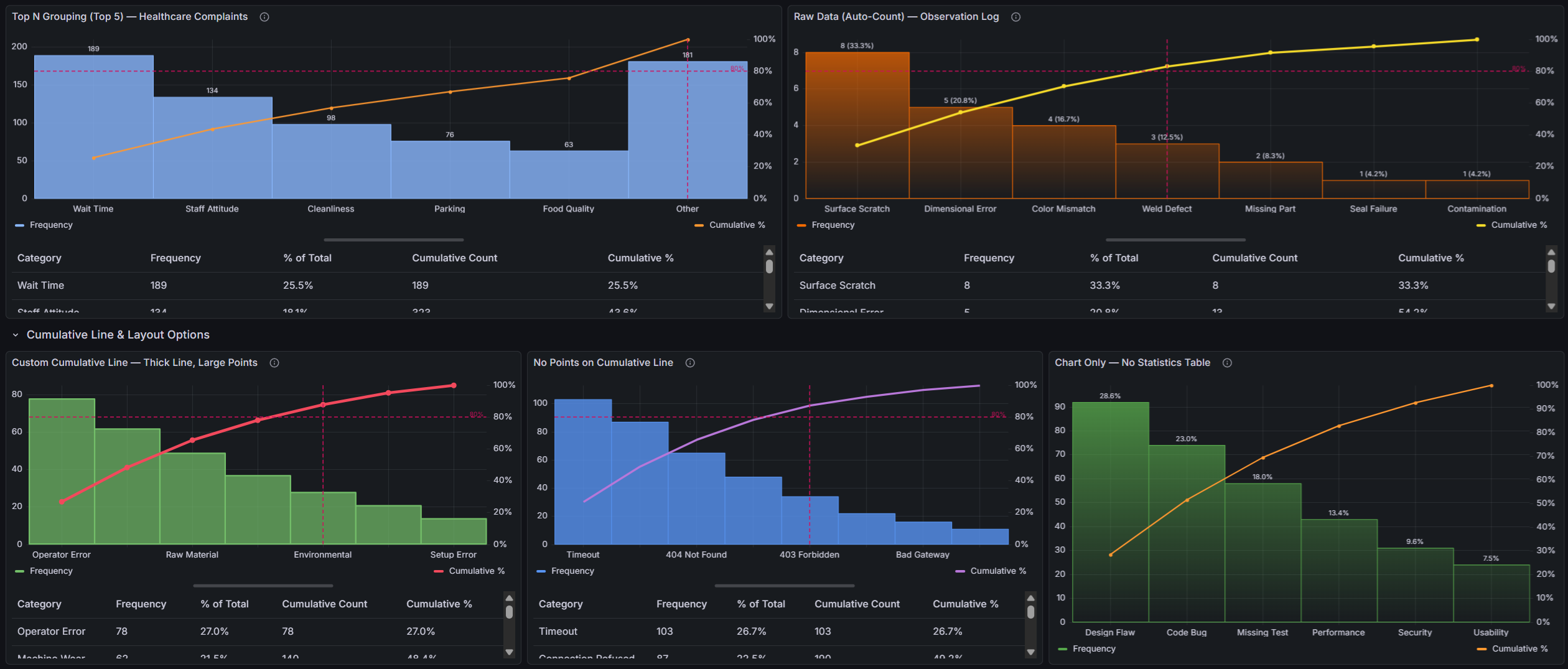
The Pareto principle (80/20 rule) states that roughly 80% of effects come from 20% of causes. This plugin makes that insight instantly visible:
- Bars sorted by impact — categories are automatically ranked from highest to lowest frequency, making the biggest contributors immediately obvious
- Cumulative percentage line — a running total overlay shows how quickly contributions accumulate toward 100%
- 80/20 threshold line — a configurable threshold line highlights where the "vital few" end and the "trivial many" begin
Built for Grafana
SPC Pareto is built using Grafana's native visualization components. This means it inherits the look, feel, and behavior you already know:
- Native theming — automatically adapts to light and dark mode
- Standard panel options — legend placement, tooltip behavior, and field overrides work just like any other Grafana panel
- Resizable statistics table — drag the splitter to balance chart and table space, just like Grafana's built-in panels
- Works with any data source — use it with SQL databases, Prometheus, InfluxDB, CSV files, or any other Grafana data source
Features
| Feature | Description |
|---|---|
| Raw data support | Accepts ungrouped observations and counts occurrences automatically |
| Automatic sorting | Categories are ranked by frequency — no manual ordering needed |
| Dual y-axes | Left axis shows frequency counts, right axis shows cumulative percentage (0–100%) |
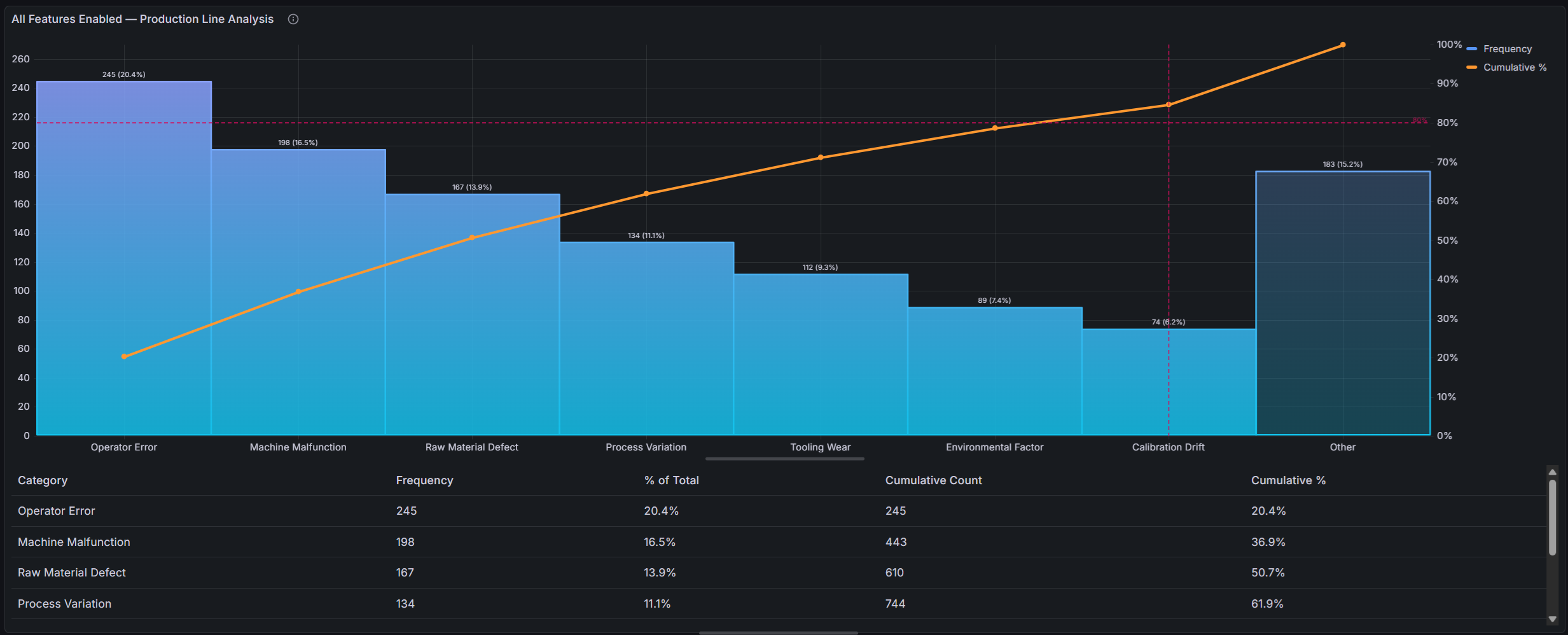
| Threshold line | Configurable threshold (default 80%) with horizontal and vertical reference lines |
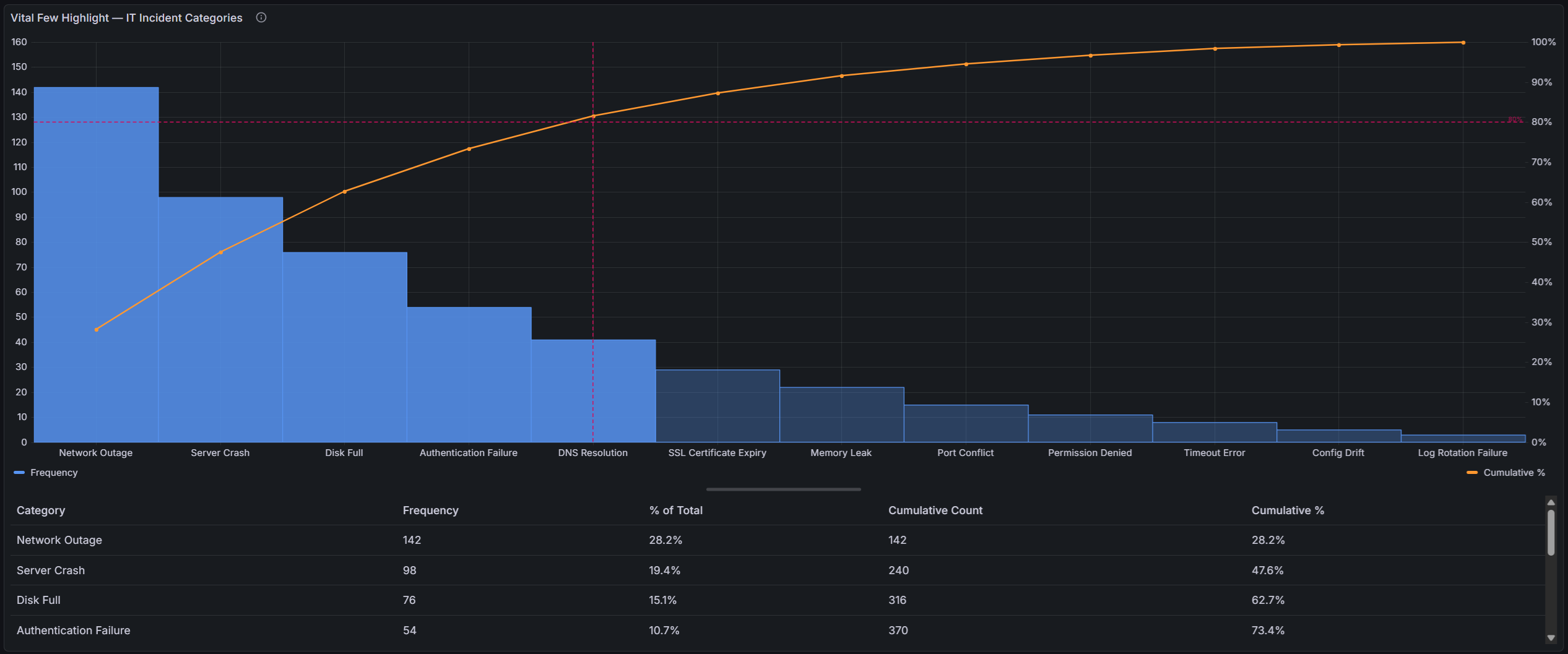
| Vital few highlight | Bars beyond the threshold crossing point are visually muted, making the vital few stand out |
| Cumulative line | Customizable color, width, and point markers |
| Top N / Other grouping | Collapse low-frequency categories into an "Other" bucket to reduce noise |
| Value labels | Optional count, percentage, or both displayed above each bar |
| Statistics table | Interactive table with category, frequency, % of total, cumulative count, and cumulative % |
| Resizable layout | Drag the splitter between chart and table to adjust the view |
Use Cases
- Manufacturing quality — identify top defect types across production lines
- IT operations — rank incident categories to prioritize root cause analysis
- Customer support — surface the most common complaint categories
- Software development — analyze bug categories, test failure reasons, or build errors
- Supply chain — rank supplier issues or shipment delay causes
Requirements
- Grafana 11 or later
Getting Started
- Install the plugin from the Grafana Plugin Catalog
- Add a new panel and select SPC Pareto as the visualization
- Configure a query that returns either:
- A string field + a number field (pre-aggregated categories and counts), or
- A string field only (raw observations — the plugin counts occurrences automatically)
- The chart automatically sorts, calculates cumulative percentages, and renders the Pareto view
Example Query (SQL — pre-aggregated)
SELECT defect_type AS category, COUNT(*) AS count
FROM inspections
WHERE $__timeFilter(inspection_time)
GROUP BY defect_type
Example Query (SQL — raw observations)
SELECT defect_type
FROM inspections
WHERE $__timeFilter(inspection_time)
The plugin counts occurrences of each unique defect_type value automatically.
Example Query (TestData)
For a quick demo, use the TestData data source with the CSV Content scenario:
category,count
Scratch,45
Dent,38
Contamination,29
Misalignment,22
Color Defect,15
Crack,12
Burr,8
Warping,6
Porosity,4
Panel Options
Threshold
| Option | Description | Default |
|---|---|---|
| Show threshold line | Display the 80/20 reference lines | On |
| Threshold value | Cumulative percentage threshold | 80% |
| Highlight vital few | Visually mute bars beyond the threshold crossing point | Off |
| Trivial bar opacity | Opacity for the muted "trivial many" bars (10–100%) | 40% |
Cumulative line
| Option | Description | Default |
|---|---|---|
| Line color | Color of the cumulative percentage line | Orange |
| Line width | Stroke width of the cumulative line | 2 |
| Show points | Show point markers on the cumulative line | On |
| Point size | Size of point markers | 5 |
Top N / Other
| Option | Description | Default |
|---|---|---|
| Limit categories | Group low-frequency categories into an "Other" bucket | Off |
| Show top N categories | Number of categories to show before grouping the rest | 10 |
Bar
| Option | Description | Default |
|---|---|---|
| Bar color | Color of the frequency bars | Blue |
| Fill opacity | Bar fill opacity (0–100%) | 80% |
| Line width | Bar border width | 1 |
| Gradient mode | None, Opacity, or Hue | None |
| Show value labels | Display labels above each bar | Off |
| Label content | Count, % of Total, or Both | Count |
Statistics table
| Option | Description | Default |
|---|---|---|
| Show statistics table | Display the interactive statistics table | On |
Documentation
For detailed documentation, configuration guides, and examples, see the full documentation.
Part of the KensoBI SPC Suite
SPC Pareto is part of a growing family of Statistical Process Control plugins for Grafana by Kenso Software:
SPC Chart Panel — Control charts for monitoring process stability over time. Supports Xbar-R, Xbar-S, and XmR charts with automatic calculation of control limits. If you're tracking whether a process is staying in control, this is your starting point.
SPC Histogram Panel — Distribution analysis with histograms, bell curves, and a built-in statistics table showing Cp, Cpk, Pp, and Ppk. Use it to understand process capability: is your process producing results within specification limits?
SPC CAD Panel — Brings 3D geometry into the picture, letting you bind the data from control charts and histograms to physical features on your parts.
License
This software is distributed under the AGPL-3.0-only license — see LICENSE for details.
Support
If you have any questions or feedback, you can:
- Ask a question on the KensoBI Discord channel.
- GitHub Issues: https://github.com/kensobi/spc-pareto/issues
Grafana Cloud Free
- Free tier: Limited to 3 users
- Paid plans: $55 / user / month above included usage
- Access to all Enterprise Plugins
- Fully managed service (not available to self-manage)
Self-hosted Grafana Enterprise
- Access to all Enterprise plugins
- All Grafana Enterprise features
- Self-manage on your own infrastructure
Grafana Cloud Free
- Free tier: Limited to 3 users
- Paid plans: $55 / user / month above included usage
- Access to all Enterprise Plugins
- Fully managed service (not available to self-manage)
Self-hosted Grafana Enterprise
- Access to all Enterprise plugins
- All Grafana Enterprise features
- Self-manage on your own infrastructure
Grafana Cloud Free
- Free tier: Limited to 3 users
- Paid plans: $55 / user / month above included usage
- Access to all Enterprise Plugins
- Fully managed service (not available to self-manage)
Self-hosted Grafana Enterprise
- Access to all Enterprise plugins
- All Grafana Enterprise features
- Self-manage on your own infrastructure
Grafana Cloud Free
- Free tier: Limited to 3 users
- Paid plans: $55 / user / month above included usage
- Access to all Enterprise Plugins
- Fully managed service (not available to self-manage)
Self-hosted Grafana Enterprise
- Access to all Enterprise plugins
- All Grafana Enterprise features
- Self-manage on your own infrastructure
Grafana Cloud Free
- Free tier: Limited to 3 users
- Paid plans: $55 / user / month above included usage
- Access to all Enterprise Plugins
- Fully managed service (not available to self-manage)
Self-hosted Grafana Enterprise
- Access to all Enterprise plugins
- All Grafana Enterprise features
- Self-manage on your own infrastructure
Installing SPC Pareto on Grafana Cloud:
Installing plugins on a Grafana Cloud instance is a one-click install; same with updates. Cool, right?
Note that it could take up to 1 minute to see the plugin show up in your Grafana.
Warning
Plugin installation from this page will be removed in February 2026. Use the Plugin Catalog in your Grafana instance instead. Refer to Install a plugin in the Grafana documentation for more information.
Installing plugins on a Grafana Cloud instance is a one-click install; same with updates. Cool, right?
Note that it could take up to 1 minute to see the plugin show up in your Grafana.
Warning
Plugin installation from this page will be removed in February 2026. Use the Plugin Catalog in your Grafana instance instead. Refer to Install a plugin in the Grafana documentation for more information.
Installing plugins on a Grafana Cloud instance is a one-click install; same with updates. Cool, right?
Note that it could take up to 1 minute to see the plugin show up in your Grafana.
Warning
Plugin installation from this page will be removed in February 2026. Use the Plugin Catalog in your Grafana instance instead. Refer to Install a plugin in the Grafana documentation for more information.
Installing plugins on a Grafana Cloud instance is a one-click install; same with updates. Cool, right?
Note that it could take up to 1 minute to see the plugin show up in your Grafana.
Warning
Plugin installation from this page will be removed in February 2026. Use the Plugin Catalog in your Grafana instance instead. Refer to Install a plugin in the Grafana documentation for more information.
Installing plugins on a Grafana Cloud instance is a one-click install; same with updates. Cool, right?
Note that it could take up to 1 minute to see the plugin show up in your Grafana.
Warning
Plugin installation from this page will be removed in February 2026. Use the Plugin Catalog in your Grafana instance instead. Refer to Install a plugin in the Grafana documentation for more information.
Installing plugins on a Grafana Cloud instance is a one-click install; same with updates. Cool, right?
Note that it could take up to 1 minute to see the plugin show up in your Grafana.
Installing plugins on a Grafana Cloud instance is a one-click install; same with updates. Cool, right?
Note that it could take up to 1 minute to see the plugin show up in your Grafana.
Warning
Plugin installation from this page will be removed in February 2026. Use the Plugin Catalog in your Grafana instance instead. Refer to Install a plugin in the Grafana documentation for more information.
Installing plugins on a Grafana Cloud instance is a one-click install; same with updates. Cool, right?
Note that it could take up to 1 minute to see the plugin show up in your Grafana.
For more information, visit the docs on plugin installation.
Installing on a local Grafana:
For local instances, plugins are installed and updated via a simple CLI command. Plugins are not updated automatically, however you will be notified when updates are available right within your Grafana.
1. Install the Panel
Use the grafana-cli tool to install SPC Pareto from the commandline:
grafana-cli plugins install The plugin will be installed into your grafana plugins directory; the default is /var/lib/grafana/plugins. More information on the cli tool.
Alternatively, you can manually download the .zip file for your architecture below and unpack it into your grafana plugins directory.
Alternatively, you can manually download the .zip file and unpack it into your grafana plugins directory.
2. Add the Panel to a Dashboard
Installed panels are available immediately in the Dashboards section in your Grafana main menu, and can be added like any other core panel in Grafana.
To see a list of installed panels, click the Plugins item in the main menu. Both core panels and installed panels will appear.
Changelog
1.0.2
Changed
- Updated to Grafana 12.4.0
- Security improvements - updated dependencies to address known vulnerabilities
1.0.1
Changed
- Removed the "Values" setting from the Legend editor
- Chart elements (bar labels, threshold line, vital highlight) now correctly follow the active Grafana theme when the theme is switched
1.0.0
Initial release.

