






















 Grafana Cloud
Monitor applications
Frontend Observability
Source map uploads
Upload with bundlers
Grafana Cloud
Monitor applications
Frontend Observability
Source map uploads
Upload with bundlersInstall source maps with bundlers
Configure Webpack, Rollup/Vite, or esbuild bundlers to automatically upload source maps to Grafana Cloud during builds.
Note
The source map upload endpoint differs from the Faro Collector endpoint. Use the endpoint shown in Frontend Observability > Settings > Source Maps > Configure source map uploads.
Faro bundler plugins support client-side rendered applications only. Server-side rendering isn’t supported. Next.js client-side apps may need _next/ path adjustments using the nextjs option.
Webpack plugin
npm install --save-dev @grafana/faro-webpack-pluginor
yarn add --dev @grafana/faro-webpack-pluginRollup/Vite plugin
npm install --save-dev @grafana/faro-rollup-pluginor
yarn add --dev @grafana/faro-rollup-pluginEsbuild plugin
Note
The esbuild plugin is currently experimental. While it provides feature parity with the rollup and webpack plugins, it may have issues or limitations. Report any problems you encounter.
npm install --save-dev @grafana/faro-esbuild-pluginor
yarn add --dev @grafana/faro-esbuild-pluginObtain an API key
To use the Faro JavaScript bundler plugins, you must generate a token for the API key value with the necessary permissions to upload source maps to Grafana Cloud. To generate a token, follow these steps:
- Navigate to the Grafana website.
- Sign in to your account and then click My Account in the top right corner.
- In the sidebar under Security, click Access Policies and then click Create access policy.
- Select the
sourcemaps:read,sourcemaps:delete, andsourcemaps:writescopes from the drop-down list. - After creating your access policy, click Add token in the card for your newly created policy.
- Create the token and be sure to copy the token value, as you aren’t be able to see it again.
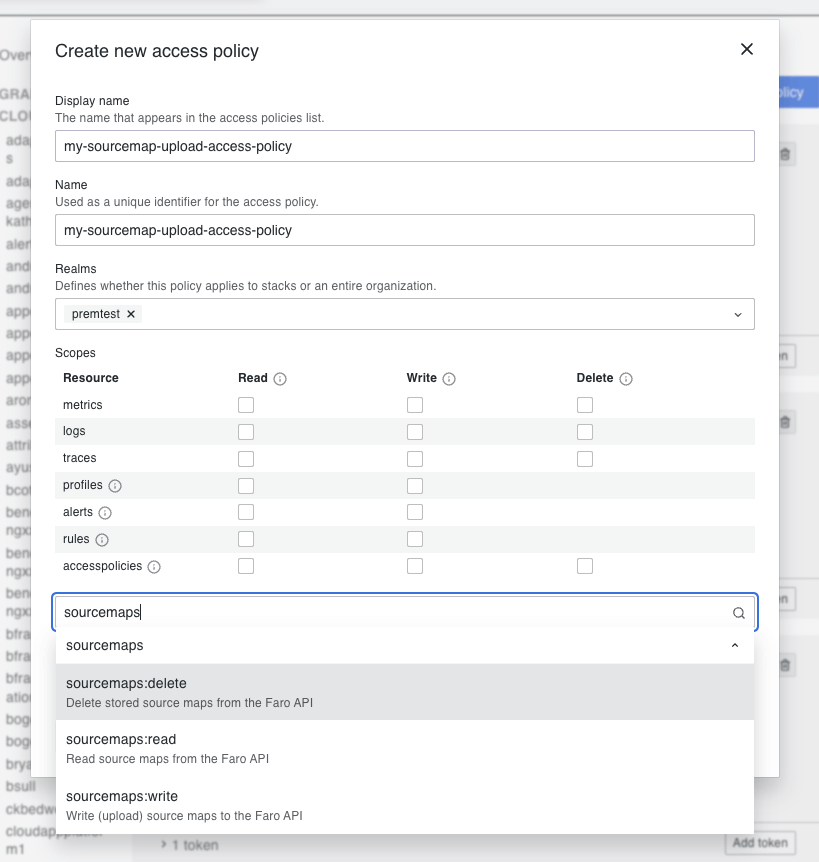
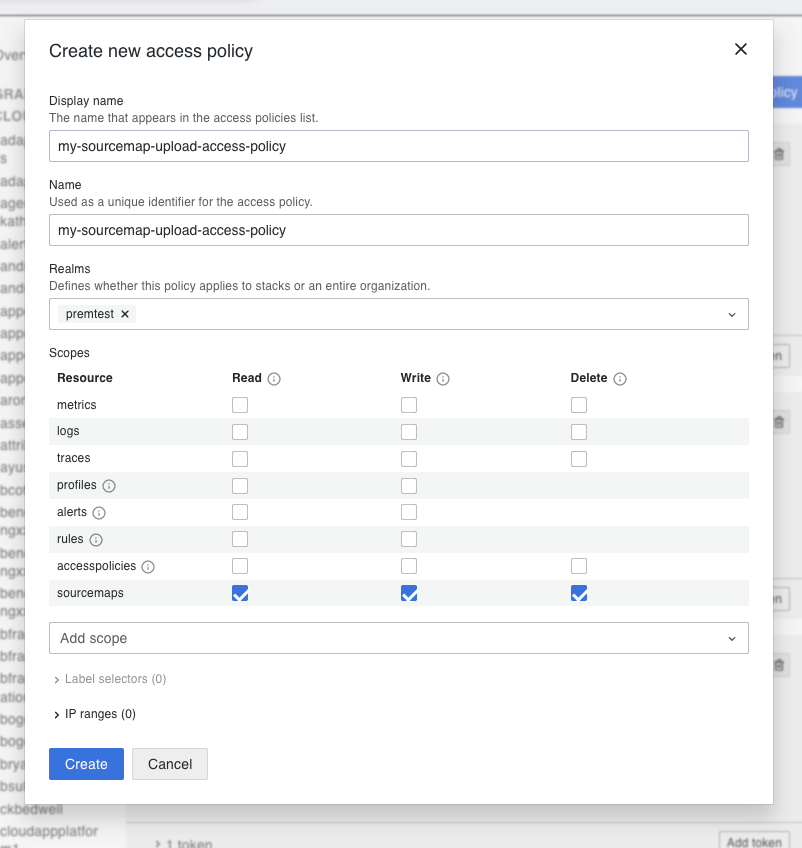
After you have generated a token with the API key value, you can use it in the Faro JavaScript bundler plugins to upload your source maps to Grafana Cloud. Use the generated token value as the apiKey value in the configuration options for the bundler plugins.
For best practices, store your token in a secure location and don’t expose it in your source code. Consider using environment variables or a secrets manager to securely store and access your API key.
Webpack configuration
Add the plugin to your webpack.config.js:
// other imports
import FaroSourceMapUploaderPlugin from '@grafana/faro-webpack-plugin';

module.exports = {
  // other configs
  plugins: [
    // other plugins
    new FaroSourceMapUploaderPlugin({
      appName: '$your-app-name',
      endpoint: '$your-faro-sourcemap-api-url',
      apiKey: '$your-api-key',
      appId: '$your-app-id',
      stackId: '$your-stack-id',
      gzipContents: true,
      // Set skipUpload: true to upload later with CLI
      // skipUpload: true,
    }),
  ],
};
Rollup/Vite configuration
Add the plugin to your rollup.config.js or vite.config.js:
// other imports
import faroUploader from '@grafana/faro-rollup-plugin';

export default defineConfig(({ mode }) => {
  return {
    // other configs
    plugins: [
      // other plugins
      faroUploader({
        appName: '$your-app-name',
        endpoint: '$your-faro-sourcemap-api-url',
        apiKey: '$your-api-key',
        appId: '$your-app-id',
        stackId: '$your-stack-id',
        gzipContents: true,
        // Set skipUpload: true to upload later with CLI
        // skipUpload: true,
      }),
    ],
  };
});
Esbuild configuration
Add the plugin to your esbuild build script:
import * as esbuild from 'esbuild';
import faroEsbuildPlugin from '@grafana/faro-esbuild-plugin';

await esbuild.build({
  entryPoints: ['src/index.ts'],
  bundle: true,
  outdir: 'dist',
  plugins: [
    faroEsbuildPlugin({
      appName: '$your-app-name',
      endpoint: '$your-faro-sourcemap-api-url',
      apiKey: '$your-api-key',
      appId: '$your-app-id',
      stackId: '$your-stack-id',
      gzipContents: true,
      // Set skipUpload: true to upload later with CLI
      // skipUpload: true,
    }),
  ],
});
Configuration options
Configure bundler plugins with these options:
Required options:
appName: string- Application name that matches your Faro Web SDK configurationendpoint: string- Source map API endpoint from Frontend Observability > Settings > Source Maps > Configure source map uploadsapiKey: string- API key withsourcemaps:read,sourcemaps:write, andsourcemaps:deletescopesappId: string- Application ID that matches your Faro Web SDK configurationstackId: string- Grafana Cloud stack ID
Optional options:
outputPath: string- Override output directory path for source maps. Uses bundler output path by defaultoutputFiles: string[] | RegExp- List of source map files or regex pattern to match. Uploads all source maps by defaultbundleId: string- Bundle/build ID. Auto-generated by defaultkeepSourcemaps: boolean- Keep source maps in generated bundle after uploading. Default:falsegzipContents: boolean- Compress source maps before uploading. Default:trueverbose: boolean- Enable detailed logging during upload. Default:falseskipUpload: boolean- Skip uploading during build and export bundle ID to environment file. Default:falsemaxUploadSize: number- Maximum upload size in bytes for single batch. Default: 30MBrecursive: boolean- Recursively search subdirectories for source maps. Default:falsenextjs: boolean- Webpack only. Prepend_next/to file properties for Next.js compatibility. Default:false
Verify source maps
After building your application, verify uploads in Frontend Observability by navigating to your app > Settings > Source Maps. If you set skipUpload: true, complete the upload using the CLI.
For troubleshooting common issues, refer to Troubleshooting.


